
I Gave Claude Code a Brain That Never Forgets. Here's Exactly How.
Andrej Karpathy's Obsidian setup went viral for a reason. Here's how to install it, why it matters, and what most tutorials get wrong.

Every morning I open Claude Code and explain the same things.
“Here’s my business.” “Here’s my voice.” “Here’s what we built last week.” “No, we decided against that approach three sessions ago.”
It’s like hiring a brilliant employee with amnesia. Every day is their first day.
Claude Code has memory. CLAUDE.md files. Project context. But let’s be honest -- it forgets. It confidently makes things up. And the longer you work with it, the more you notice the gap between what it knows in this session and what it should know from last week.
Then Andrej Karpathy published a solution. It got almost 20 million views.

If you don’t know who Karpathy is: he’s one of the most important people in AI. He was the founding member of OpenAI. He built and led Tesla’s Autopilot vision team. He was head of AI at Tesla for five years, directly reporting to Elon Musk. Before that, he trained under Fei-Fei Li at Stanford, working on some of the foundational research in deep learning and computer vision. His Stanford CS231n course on convolutional neural networks basically taught an entire generation of AI engineers.
When Karpathy shares how he personally uses AI tools, people pay attention. This isn’t a YouTuber reviewing the latest shiny thing. This is one of the architects of modern AI showing you how he organises his own knowledge.
And his solution is disarmingly simple.
It’s not a fancy RAG pipeline. It’s not a vector database. It’s Obsidian -- a free note-taking app -- connected to Claude Code through a few markdown files and some hooks.
I set it up last week. It changed how I work with Claude.
Here’s the full setup.

Why This Matters More Than You Think
The problem isn’t that Claude is dumb. It’s that Claude has no long-term memory.
Every session starts fresh. Claude reads your CLAUDE.md, reads whatever files you point it to, and does its best. But it doesn’t remember that three weeks ago you decided to use Supabase instead of Firebase. It doesn’t know that your newsletter performs best on Tuesdays. It doesn’t remember that the last time you tried that approach, it broke the checkout flow.
You end up being the memory. And that means you spend 10 minutes at the start of every session catching Claude up. Or worse, you don’t -- and Claude makes decisions based on incomplete information.
What Karpathy built solves this.
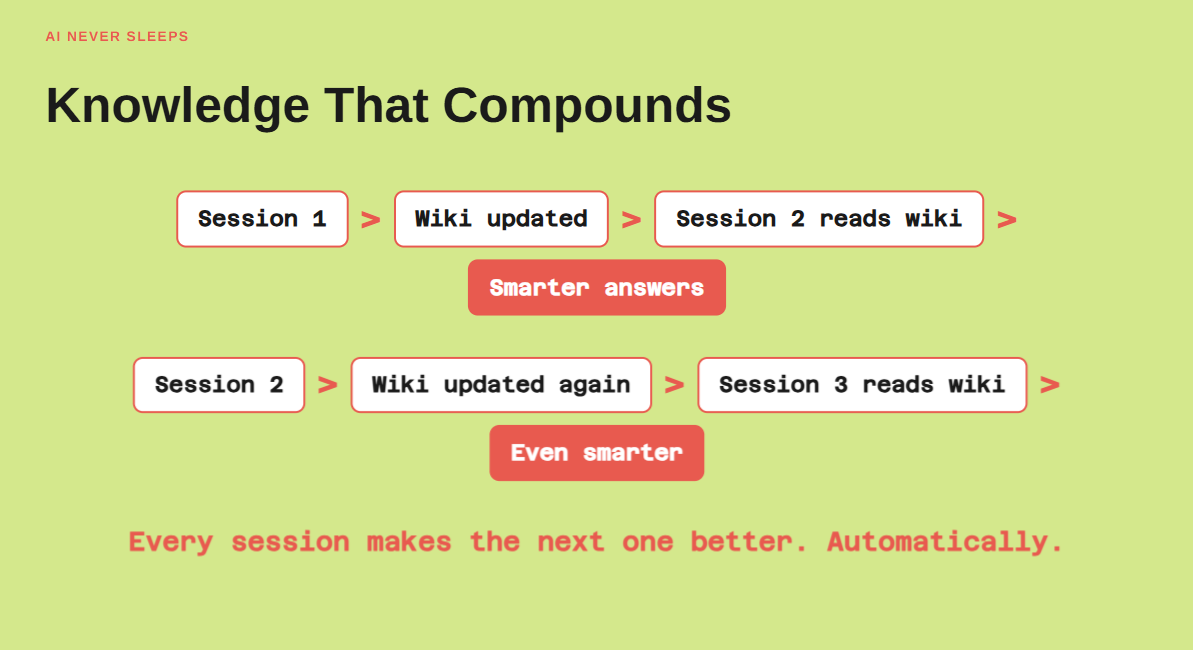
Instead of Claude starting fresh every session, it starts by reading a structured wiki that contains everything it’s learned from every previous session. Decisions. Lessons. Architecture choices. What worked. What didn’t.
And the wiki updates itself. Every session adds new knowledge. Every question asked gets the answer filed away. Next time you ask something related, Claude finds it in the wiki instead of guessing.
Knowledge compounds. That’s the shift.
The Architecture (Simple Version)
Forget vector databases. Forget embeddings. Forget Pinecone (for now).
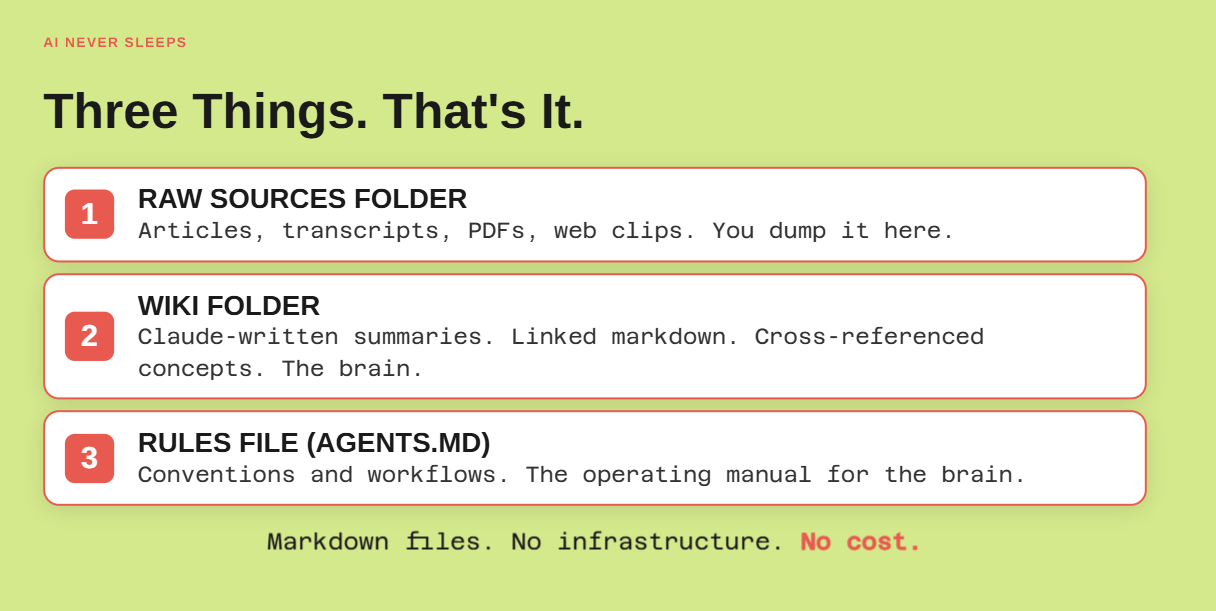
The entire system is three things:
1. A raw sources folder. Articles, transcripts, PDFs, web clips. Stuff you want Claude to know about. You dump it here.
2. A wiki folder. Claude-written summaries, linked markdown files, cross-referenced concepts. This is the brain. Claude reads from it. Claude writes to it.
3. A rules file. Conventions, workflows, and instructions that tell Claude how to maintain the wiki. Think of it as the operating manual for the brain.
That’s it. Three folders. Markdown files. No infrastructure.
Here’s the mental model that clicks:
CLAUDE.md = Who I am (identity, rules, read-first instructions)
Obsidian wiki = How I think (decisions, patterns, connections, active projects)
Raw sources = What I’ve read (articles, research, transcripts)
Claude reads CLAUDE.md to know who it’s working for. It reads the wiki to know what it already knows. It reads raw sources to learn new things and file them into the wiki.
Step 1: Install Obsidian (2 minutes)
Download Obsidian from obsidian.md. It’s free.
Create a new vault. Call it whatever makes sense for your use case. I have one for AI Never Sleeps (content, business decisions, audience insights) and I’m considering a second for Pear (product decisions, tech stack, partner notes).
One domain per vault. Don’t put everything into one mega-vault. Keep it focused.
Inside your vault, create this folder structure:
my-second-brain/
agents.md # Rules and instructions for Claude
index.md # Catalog of everything in the wiki
raw/ # Unprocessed sources you want Claude to learn from
wiki/ # Processed, linked knowledge (Claude writes here)
logs/ # Daily session summaries (auto-generated)
That’s the skeleton. Claude will fill it in.
Step 2: Write Your agents.md File (15 minutes)
This is the most important file in the system. It tells Claude what this wiki is for, how to maintain it, and what conventions to follow.
Here’s the structure I use:
# Agent Instructions
## Purpose
This is the knowledge base for [your project/business].
You are a wiki maintainer. When you learn something new,
file it into the wiki. When answering questions, search
the wiki first.
## Conventions
- One concept per file
- Use [[wiki links]] to connect related concepts
- Every wiki page needs: title, summary, related links
- When a source updates an existing concept, update the
wiki page (don’t create a duplicate)
- Flag contradictions when you find them
## Folder Rules
- /raw = unprocessed sources. Read, extract, file into /wiki
- /wiki = processed knowledge. This is what you query.
- /logs = session summaries. Auto-generated.
- index.md = always kept up to date with current structure
## When Starting a Session
1. Read this file
2. Read index.md to understand what’s in the wiki
3. Check /logs for recent session summaries
4. Then proceed with the user’s request
## When Ending a Session
1. Summarize key decisions, lessons, and action items
2. Update any wiki pages affected by this session
3. Update index.md if new pages were created
4. Save session summary to /logs with today’s date
Spend time on this. It’s the onboarding document for your AI employee’s permanent memory. The better this is, the smarter every future session becomes.
Step 3: Create Your index.md (5 minutes)
The index is the table of contents. Claude reads this first to understand what exists in the wiki and where to find it.
Start simple:
# Knowledge Base Index
## Last Updated: 2026-04-14
## Wiki Pages
(none yet -- Claude will populate this as you add sources)
## Recent Sessions
(auto-populated from /logs)
As you add sources and have sessions, Claude will expand this. Within a week, you’ll have a rich index that Claude navigates like a map.
Step 4: Set Up Claude Code Hooks (10 minutes)
This is where it gets powerful. Claude Code has hooks -- scripts that run automatically at the start, during, and at the end of every session.
Open your Claude Code settings (in .claude/settings.json or via the CLI) and add:
Session Start Hook: Load agents.md and index.md into context at the beginning of every session. Claude starts every conversation already knowing what’s in the wiki.
Pre-Compact Hook: Before Claude’s context gets compressed (when you hit the context limit), capture the conversation as a log entry. This prevents losing important context during long sessions.
Session End Hook: Summarize the session -- decisions made, lessons learned, action items -- and save it to /logs/YYYY-MM-DD.md. Then update any wiki pages that were affected.
The hooks mean you don’t have to remember to tell Claude to update the wiki. It happens automatically. Every session contributes to the brain.
Step 5: Feed It Your First Sources (20 minutes)
Drop some raw sources into the /raw folder. Articles you’ve saved. Meeting transcripts. Research notes. Strategy documents.
Then tell Claude:
“Read everything in /raw. For each source, extract the key concepts. Create or update wiki pages in /wiki for each concept. Link related concepts together. Update index.md.”
Watch what happens.
One article about AI agent orchestration might create wiki pages for: “agent orchestration,” “Paperclip,” “heartbeat systems,” “delegation vs creation,” and “multi-agent feedback loops.” Each one linked to the others. Each one cross-referenced in the index.
The next article you add? Claude doesn’t create duplicate pages. It updates existing ones with new information. It flags contradictions. It adds connections you might not have seen.
This is compounding knowledge. One source updates ten wiki pages in a single pass.
Step 6: Start Using It (Ongoing)
From now on, every Claude Code session starts with context from the wiki. You don’t explain your business model again. You don’t re-describe your tech stack. You don’t remind Claude about the decision you made last Tuesday.
It already knows.
Ask questions: “Based on our wiki, what content topics have we identified as high-performing?” Claude searches the wiki, pulls relevant pages, synthesizes an answer. Ten seconds. No sub-agents spinning up.
Make decisions: “We’re switching from Resend to Usesend for email. Update the wiki.” Claude updates the relevant wiki pages, adjusts cross-references, and the next time email comes up, it already knows the current stack.
Build on previous work: “Last week we designed the Paperclip agent prompts. Refine the CEO prompt based on what we learned in the webinar.” Claude pulls the wiki page, reads the session logs from the webinar, and gives you an informed refinement -- not a cold start.
Common Mistakes to Avoid
Mistake 1: Dumping 10,000 files into the raw folder.
This system works beautifully up to about 100 files. Past that, the index gets expensive to load (every file name costs tokens). For large archives -- thousands of YouTube transcripts, years of articles -- use a vector database like Pinecone as the archive layer. Keep Obsidian for active, working knowledge.
Mistake 2: Not writing a good agents.md.
If your rules file is vague, your wiki will be vague. Spend 15 minutes writing clear conventions. It pays back every session.
Mistake 3: Never running maintenance.
Every couple of weeks, tell Claude: “Run a wiki lint. Check for stale pages, contradictions, orphan pages with no links, and outdated information.” This keeps the brain healthy. Without it, information drifts and you start getting confident-but-wrong answers.
Mistake 4: Putting everything in one vault.
Your AI business notes and your personal reading list are different contexts. Separate vaults. Separate agents.md files. Separate wikis. Claude performs better with focused, domain-specific knowledge.
The Three-Layer Model
After running this for a week, here’s how I think about the full stack:
Layer 1: CLAUDE.md -- Who I am. Voice, identity, rules. Never changes much. This is the constant.
Layer 2: Obsidian wiki -- How I think. Active projects, decision logs, idea connections, lessons learned. This is where reasoning happens. Updated every session.
Layer 3: Vector database (Pinecone or Pgvector (postgres))
) -- What I’ve consumed. Transcripts, research archives, books. This is for exact recall of specific passages. Queried occasionally.
Think of it as:
CLAUDE.md = personality
Obsidian = working memory
Pinecone = long-term archive
Most people only have Layer 1. Adding Layer 2 is the change that compounds.
What’s Coming Next Week
This week: you’ve got a second brain running locally.
Next week’s webinar: I’m going to show you how to set this up and also connect this to your OpenClaw bot so you can access your knowledge base from anywhere. Phone. Telegram. Discord. Your AI has a brain AND you can talk to it from the couch at 10pm.
Same wiki. Same knowledge. But now it’s accessible through a persistent agent you can message, not just a terminal session you have to sit in front of.
That’s when it gets real.
🔒 The section below is for paid subscribers.
Paid subscribers get my complete agents.md file (the actual one I use, not a template), the hook scripts for automatic session logging, and the maintenance prompt I run every two weeks.
